
November 2026
Realtime T52F Biometric Face with WiFi Attendance Machine
Realtime T52F is a face and fingerprint attendance machine with card and password options, Wi-Fi and simple access control. It suits small offices that want touch-free face punching with fingerprint as a backup. It stores 1,000 users of each type.
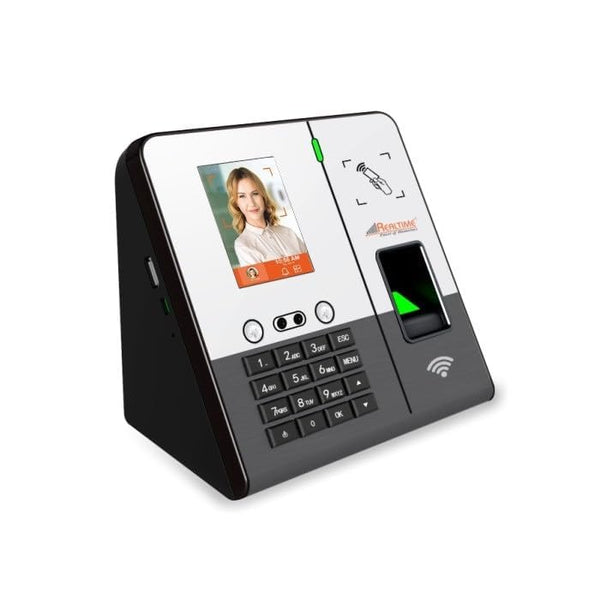
Specifications
| Face capacity | 1,000 |
|---|---|
| Fingerprint capacity | 1,000 |
| Card capacity | 1,000 |
| Password capacity | 1,000 |
| Attendance records | 1,00,000 |
| Fingerprint verification | 1:1, 1:N |
| Working modes | Offline and online |
| Verification modes | Face, fingerprint, ID card, password and combinations |
| Screen | 3 inch colour display |
| Communication | TCP/IP, USB device, P2P, Web, Wi-Fi |
| USB disk | Supported |
| Power supply | 12 V DC |
| Working current | 500 mA |
| Sound indicator | Buzzer, voice |
| QR reader support | Yes, on Wiegand IN |
| Wiegand | IN and OUT |
| Exit button support | Push button and no-touch button |
| Working temperature | -10 °C to +60 °C |
| Working humidity | 20% to 80% RH |
| Self-test function | Supported |
| Power management | Sleep mode |
| FAR / FRR | 0.001% / 1% |
| Access control | Simple, built in |
Frequently asked questions
It stores 1,000 faces, 1,000 fingerprints, 1,000 cards and 1,000 passwords, with up to 1,00,000 records.
Yes. It supports Wi-Fi, TCP/IP LAN, P2P, web and USB.
Yes. It has simple built-in access control with push or no-touch exit button support.
Yes, on the Wiegand IN port.
It works on 12 V DC and draws about 500 mA.
It is rated for -10 °C to +60 °C.
The T52F+ stores 3,000 faces and 10,000 fingerprints. The T52F stores 1,000 of each.
It identifies each person by fingerprint, face, palm or card and records the exact punch time. Reports can be downloaded as Excel or PDF, and many models connect to software over LAN or Wi-Fi, depending on the model.
A wall mount or desk stand, a power adapter and, for network models, a LAN cable or Wi-Fi. Our team gives free technical support for setup.
Yes. Free technical support is available for installation and setup.