NavKar Systems
NAVKAR SYSTEMS Combo-CN307 ACJ-400 Home Security Alarm System Complete Kit with 1 Wireless Vibration Sensor VS-43 | Smart Anti-Theft Security System with App Alerts, SMS & Call Notifications
NAVKAR SYSTEMS Combo-CN307 ACJ-400 Home Security Alarm System Complete Kit with 1 Wireless Vibration Sensor VS-43 | Smart Anti-Theft Security System with App Alerts, SMS & Call Notifications
Couldn't load pickup availability
Product Description
- Buy on Amazon: CLICK HERE TO BUY ON Website
Product Overview
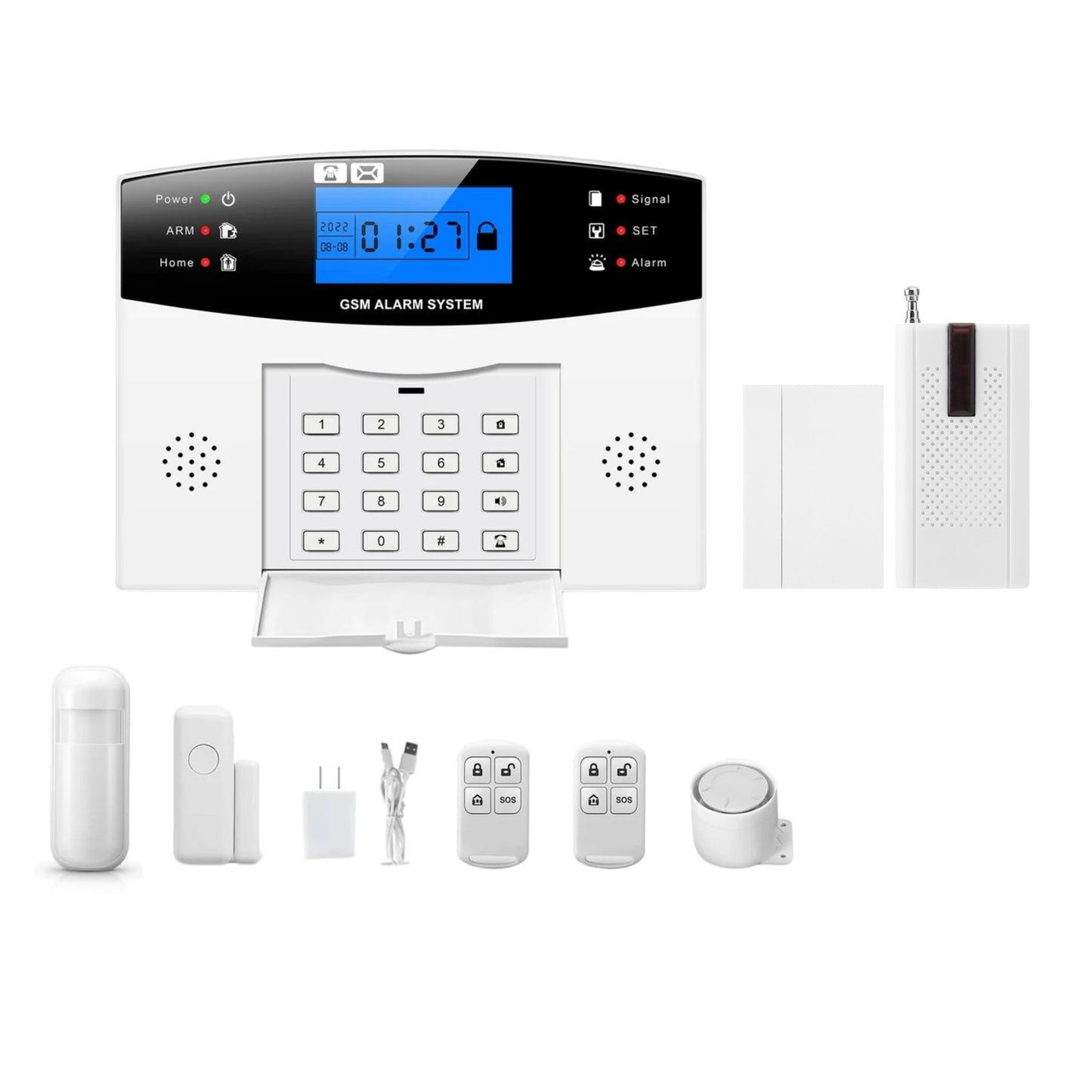
The NAVKAR SYSTEMS Combo-CN307 ACJ-400 Home Security Alarm System is an advanced anti-theft and intrusion detection solution designed to provide reliable protection for homes, offices, shops, warehouses, garages, and commercial properties. This complete security kit includes the ACJ-400 alarm control panel and 1 Wireless Vibration Sensor VS-43, offering enhanced protection against unauthorized access, tampering, glass breakage, and forced entry attempts.
The included VS-43 wireless vibration sensor detects vibrations, impacts, and movement on doors, windows, shutters, safes, and valuable assets. When triggered, the system instantly sends notifications via mobile app alerts, SMS messages, phone calls, and siren activation, ensuring you remain informed and protected at all times.
The ACJ-400 alarm system supports multiple wireless accessories, customizable defense zones, and backup battery operation, making it a flexible and dependable security solution for residential and commercial applications.
Key Benefits
🔐 Complete Anti-Theft Security Kit
Includes the ACJ-400 Security Alarm Panel and 1 Wireless Vibration Sensor VS-43 for advanced intrusion and tamper detection.
📳 Wireless Vibration Sensor VS-43 Included
The included vibration sensor detects impacts, vibrations, tampering attempts, glass breakage, and unauthorized movement for enhanced security protection.
🚨 Instant Alarm Notifications
Receive immediate alerts through mobile app notifications, SMS messages, phone calls, and loud siren activation during security events.
🏠 Expandable Wireless Security System
Supports multiple wireless accessories including door sensors, PIR motion detectors, smoke detectors, vibration sensors, panic buttons, and sirens.
📱 Remote Monitoring & Control
Monitor, arm, and disarm your security system remotely using compatible mobile applications and remote controls.
🔋 Backup Battery Protection
Built-in rechargeable battery backup ensures continuous security monitoring during power outages.
🛡️ Multiple Security Zone Modes
Supports entry zone, perimeter zone, interior zone, 24-hour zone, emergency zone, and custom defense zone settings.
🔧 Easy DIY Installation
Wireless accessories allow quick installation without complicated wiring or professional assistance.
🏢 Ideal for Residential & Commercial Applications
Suitable for homes, apartments, offices, shops, warehouses, garages, factories, farmhouses, and commercial premises.
Important Features
- Complete Security Kit: ACJ-400 alarm panel with VS-43 vibration sensor.
- WiFi + GSM Connectivity: Supports remote security monitoring.
- Vibration Detection: Detects impact, tampering and forced entry.
- Instant Alerts: App notifications, SMS and phone-call alerts.
- Expandable System: Supports multiple wireless security sensors.
- Remote Control: Arm/disarm through app and remote controls.
- Backup Battery: Provides security during power outages.
- Easy Installation: Wireless sensors for flexible installation.
-
Wide Application: Suitable for homes, offices, shops and warehouses.
Product Specifications
- Model: ACJ-400 with VS-43
- Product Type: WiFi + GSM Security Alarm System
- Brand: NAVKAR SYSTEMS
- Power Supply: DC 12V ±5% / 100mA
- Communication: WiFi + GSM + RF Wireless
- Operating Range: Up to 100 m for compatible wireless sensors, depending on installation conditions
- Material: ABS Plastic
- Dimensions: 21 x 15 x 9 cm
- Weight: 650g
- Other Specifications: Auto-dialing, SMS alerts, phone call alerts, remote monitoring, multiple security zones, wireless sensor support, PIR motion detection, door/window sensor support, wired siren and remote-control support.
Applications
- Home Security – Protects houses and apartments against unauthorized entry.
- Office & Commercial Security – Suitable for offices, shops, and small businesses.
-
Entry & Intrusion Monitoring – Monitors doors, windows, and indoor areas using compatible sensors.
Suitable For
- Homes & Apartments – Suitable for residential security and intrusion monitoring.
- Offices, Shops & Small Businesses – Helps monitor secured areas and entry points.
-
Indoor Security Installations – Suitable for installations using compatible wireless sensors and alarm accessories.
Not Suitable For
- Standalone Operation Without Compatible Sensors – The system requires compatible sensors/accessories for intrusion detection.
- Areas Without Required GSM/WiFi Connectivity – Remote communication features depend on the availability of the required network connection.
-
Outdoor Exposure Without Suitable Protection – The alarm panel and accessories should be installed according to their environmental specifications.
Package Contents
- 1 × ACJ-400 Security Alarm Control Panel
- 1 × Wireless Vibration Sensor VS-43
- 1 × Wireless PIR Motion Sensor
- 1 × Wireless Door/Window Sensor
- 2 × Remote Controls
- 1 × Wired Siren
- 1 × Power Adapter
-
1 × User Manual
Installation
- Step 1 – Mount the ACJ-400 Control Panel: Install the alarm panel at a suitable indoor location near a power source.
- Step 2 – Install the VS-43 Vibration Sensor: Secure the wireless vibration sensor on the door, window, shutter, safe, or other protected surface where vibrations or impacts can be detected.
- Step 3 – Install Other Wireless Sensors: Position the included PIR and door/window sensor at suitable locations to cover the required entry and movement areas.
- Step 4 – Install the Wired Siren: Mount the siren where its alarm sound can be clearly heard throughout the protected area.
- Step 5 – Power the System: Connect the ACJ-400 to the compatible power adapter and switch on the system.
- Step 6 – Pair the Accessories: Register the VS-43, PIR sensor, door/window sensor, siren and remote controls with the ACJ-400 according to the user manual.
- Step 7 – Configure the System: Set up the required WiFi/GSM connection, phone numbers, security zones and alarm settings.
-
Step 8 – Test the System: Test the vibration sensor, PIR, door sensor, siren, remote controls and app/SMS/call alerts to ensure proper operation.
Wiring
The ACJ-400 uses a power connection for the main control panel and wireless communication with compatible sensors and accessories. Follow the supplied user manual for the exact terminal connections.
- Power: Connect the ACJ-400 to its compatible DC power adapter.
- Input: Wireless door/window sensors, PIR sensors and other compatible wireless alarm accessories.
- Output: Wired siren and alarm notifications through the configured communication system.
- Other Connections: GSM SIM card and WiFi network connection for remote alerts and monitoring.
Programming
-
Step 1 – Configure the Communication Settings
Connect the ACJ-400 to the required WiFi network and configure the GSM SIM card for SMS and phone-call alerts. -
Step 2 – Register Wireless Accessories
Pair/register the compatible door/window sensors, PIR motion sensors, Vibration sensor, smoke sensors, shutter sensors, beam sensors, remote controls and wired siren with the ACJ-400 according to the user manual. -
Step 3 – Configure Security Settings
Program the required phone numbers, security zones, arming modes, alarm settings and other system parameters according to the user manual. -
Step 4 – Test the System
Trigger each connected sensor and operate the remote controls to verify that the alarm panel, siren and configured SMS/phone alerts work correctly.
Operation
-
Step 1 – Arm the System
Use the remote control or configured app to activate the ACJ-400 security system. The connected sensors will monitor the protected areas. -
Step 2 – Monitor & Detect
When a registered door/window sensor or PIR motion detector is triggered, the ACJ-400 identifies the security event and activates the configured alarm response. -
Step 3 – Receive Alerts
When an alarm is triggered, the system activates the connected siren and, when configured, sends SMS or phone call alerts to the preset numbers through GSM.
Troubleshooting
-
Problem: The ACJ-400 alarm panel does not power on.
Solution: Check the power adapter, power connection, and electrical supply. Ensure the compatible power supply is connected properly. -
Problem: VS-43 vibration sensor does not trigger the alarm.
Solution: Check whether the sensor is correctly paired with the ACJ-400, verify the sensor battery, and ensure it is securely installed on the protected surface. -
Problem: Wireless sensors are not responding.
Solution: Check sensor pairing, battery condition, and wireless signal/range. Ensure there are no major obstructions between the sensor and alarm panel. -
Problem: App alerts are not received.
Solution: Check the WiFi connection, app settings, and alarm panel's network configuration. -
Problem: SMS or phone-call alerts are not received.
Solution: Check the SIM card, GSM signal, registered phone numbers, and GSM communication settings. -
Problem: Siren does not sound during an alarm.
Solution: Check the siren connection, power supply, and whether the siren has been correctly registered/configured with the ACJ-400.
Common Problems
-
Problem 1: WiFi connection is not working
Solution: Check the WiFi network, password, and internet connection. Reconnect the ACJ-400 to WiFi if required. -
Problem 2: VS-43 vibration sensor is not responding
Solution: Check the sensor battery, pairing status, installation, and distance from the ACJ-400. Re-pair the sensor if necessary. -
Problem 3: False alarm is triggered
Solution: Check the VS-43 sensor installation and sensitivity, and verify the alarm zone and system settings.
FAQs
Q: Can the ACJ-400 work with both WiFi and GSM?
A: Yes, the ACJ-400 supports WiFi and GSM connectivity for remote monitoring and alarm notifications.
Q: What happens when the VS-43 vibration sensor detects an impact?
A: The ACJ-400 receives the wireless alarm signal and activates the configured alarm response, with notifications available through the supported communication methods.
Q: Can I monitor the ACJ-400 remotely?
A: Yes, the system supports remote monitoring and control through the compatible smartphone app.
Q: Can additional wireless sensors be added?
A: Yes, compatible wireless alarm sensors and accessories can be added according to the ACJ-400's supported capacity.
Q: Where can the VS-43 be installed?
A: It can be installed on suitable doors, windows, shutters, safes, and other surfaces where vibration or impact detection is required.
Q: Is the ACJ-400 suitable for homes and businesses?
A: Yes, it is suitable for homes, apartments, offices, shops, warehouses, garages, and other premises requiring intrusion detection.
Spare Parts
-
Spare Part 1: ACJ-400 Power Adapter
Replacement power adapter for the ACJ-400 alarm control panel. -
Spare Part 2: Wireless Door/Window Sensor
Replacement magnetic sensor for monitoring doors and windows. -
Spare Part 3: PIR Motion Sensor
Replacement PIR sensor for indoor motion detection. -
Spare Part 4: Wireless Remote Control : 2 pcs
Replacement remote for arming, disarming and emergency functions. -
Spare Part 5: Wired Siren
Replacement siren for audible alarm alerts.
Warranty
Warranty Period: 1 Year
The ACJ-400 is covered by a 1-year warranty against manufacturing defects under normal use. Warranty does not cover damage caused by incorrect installation, improper wiring, physical damage, power fluctuations, water or moisture, unauthorized modification, or misuse.
For warranty support, please provide the purchase invoice, product model, serial number (if applicable), and details of the issue.
Videos
Manuals
- User Manual: Click Here to check PDF File
- Installation Manual:

Downloads
- [Datasheet]: Refer to the user manual
- [Wiring Diagram]: Refer to the user manual
- [Catalogue / Brochure]: N/A
- [Other Download]: N/A
Customer Questions
Q: Does the ACJ-400 support both WiFi and GSM connectivity?
A: Yes, the ACJ-400 supports WiFi and GSM connectivity for remote monitoring and alarm notifications.
Q: Can the system send alerts to my phone?
A: Yes, when configured correctly, the system can send SMS and phone call alerts to preset numbers through GSM.
Q: Can I add additional wireless sensors?
A: Compatible wireless sensors and accessories can be added according to the supported capacity and configuration of the ACJ-400.
Q: Can the ACJ-400 be used for offices and shops?
A: Yes, it is suitable for homes, apartments, offices, shops and small commercial premises.
Q: What sensors can be connected to the system?
A: The system supports compatible wireless security accessories such as door/window magnetic sensors, PIR motion sensors and wired sirens.
Q: Is a mobile app available for the ACJ-400?
A: Yes, the ACJ-400 supports mobile app-based remote monitoring and control through its compatible app.
Tuya or Smart Life App for Android
https://play.google.com/store/apps/details?id=com.tuya.smartlife&hl=en&pli=1
and for Apple Devices
https://apps.apple.com/us/app/smart-life-smart-living/id1115101477
Escalation to Support
If the issue cannot be resolved using the information above, please contact Navkar Systems at whatsapp Support number: 91384 68548 with the following information:
- Product Model:
- Purchase Date:
- Problem Description:
- Installation Details:
- Photos / Videos:
- Previous Troubleshooting Performed:
Frequently asked questions
How does a wireless alarm system work?
Sensors on doors, windows and rooms send a radio signal to the alarm panel. The panel sounds a loud siren and, on Wi-Fi or GSM models, sends phone alerts.
Can I add more sensors later?
Yes. Wireless sensors, remotes and panic buttons from the same frequency can be paired with the panel. The number of zones is listed in the product details.
Does it work without internet?
GSM models use a SIM card to call or send SMS even without Wi-Fi. Wi-Fi models need working internet for app alerts.
Is a GST invoice provided?
Yes. NavKar Systems provides a GST invoice with every order and delivers across India.
Is technical support available?
Yes. Free technical support is available for installation and setup.