



NavKar Systems
Combo-CN131 Perimeter Boundary Security Intrusion Alarm Security System Using Beam Sensor
Combo-CN131 Perimeter Boundary Security Intrusion Alarm Security System Using Beam Sensor
 . Cheaper here, direct.
- Amazon.in price
- Rs. 8,499
- Here, direct
- Rs. 8,074
- You save
- Rs. 425 (5% less)
Amazon price checked 28 Oct 2026; Amazon prices change often. All our prices include GST, with the same warranty and free support.
Couldn't load pickup availability
ACJ-400 GSM Security Alarm System with Dual Beam Sensor
Product Overview
The NAVKAR SYSTEMS ACJ-400 GSM Security Alarm System with Dual Beam Sensor is a perimeter intrusion protection solution designed to secure boundary walls, open areas, gardens, pools, houses, shops and other protected premises. The kit combines the ACJ-400 GSM autodialer security alarm panel with an ABT-100 dual-beam infrared detector pair to detect an interruption of the infrared beams and trigger the alarm system.
The dual-beam detector uses two infrared beams between the transmitter and receiver. The units can be installed up to 100 metres apart, allowing protection across wider outdoor boundaries. The detector supports adjustable beam-interruption timing to help control detection sensitivity and reduce unwanted alarms.
When the protected beam is interrupted, the detector provides an alarm output to the connected security system. The ACJ-400 provides GSM autodialing and alert functionality, allowing preset users to receive alarm notifications through supported GSM communication.
Main Purpose
To protect boundary walls, open areas, gardens, pools, houses, shops, warehouses, and other premises by detecting unauthorized intrusion through an infrared beam barrier.
Key Benefits
- Early Intrusion Detection: Detects an intruder when the infrared beam is interrupted.
- This Kit Includes: Security System with GSM Autodialer Inbuilt (Siren, Adapter, 2 Nos Remotes included), 1 Pair of Beam Sensor (Transmitter & Receiver), & 2 Nos Extra Adapters for Beam Sensors & has 1 Year Warranty of Security Alarm Panel Main Kit.
- Detector pair: No. Of Beams- 2, Distance between beams- The Beams can be mounted up to 100 meters apart, Time adjustment for pass blocking (have influence on detection sensitivity- User selectable digital processing programmable time
- Wide Area Protection: Supports a beam distance of up to 100 metres.
- Reduced False Alarms: Dual-beam detection with adjustable detection timing helps improve detection reliability.
- GSM Alerting: Connected ACJ-400 system can provide GSM-based alarm notifications.
- Flexible Installation: Suitable for outdoor perimeter protection without extensive cable-laying in supported wireless configurations.
Important Features
- 2-Beam Infrared Detection
- Up to 100 m Transmitter-to-Receiver Distance
- Adjustable Detection Timing
- NO/NC Alarm Output
- DC 10.5–30V Detector Operation
- -30°C to +50°C Operating Temperature
- Optional 315/433 MHz RF Configuration
- Low-Battery Monitoring in Supported Configuration
- Compatible with ACJ-400 GSM Security Alarm System
Product Specifications
- Model: ACJ-400 + ABT-100
- Product Type: GSM Security Alarm System with Dual-Beam Infrared Perimeter Sensor
- Brand: NAVKAR SYSTEMS
- Power Supply: ACJ-400: Compatible DC power adapter; ABT-100: DC 10.5–30V
- Communication: GSM + RF Wireless (315/433 MHz RF version, where applicable)
- Operating Range: Up to 100 metres between the dual-beam transmitter and receiver
- Material: Not specified by the manufacturer
- Dimensions: Package: 7.5 × 7.3 × 7.1 inches
- Weight: Approx. 0.6 kg without adapter
- Other Specifications: 2-beam infrared detection, adjustable beam-interruption timing, NO/NC alarm output, -30°C to +50°C operating temperature, low-battery monitoring in supported configuration, GSM autodialing, SMS/phone alerts, and compatibility with the ACJ-400 alarm system.
Applications
- Boundary & Perimeter Security – Protects open boundaries and property perimeters from intrusion.
- Residential Security – Suitable for homes, gardens, farmhouses and pool areas.
- Commercial & Industrial Security – Suitable for shops, warehouses, factories and commercial premises.
Suitable For
- Suitable Customer: Homeowners, shop owners, warehouses, factories and property managers.
- Suitable Environment: Outdoor and open-area perimeter protection.
- Suitable Installation: Locations where the transmitter and receiver can be aligned with a clear beam path, up to 100 metres apart.
Not Suitable For
- Not Suitable For: Indoor-only applications where perimeter beam protection is not required.
- Important Limitation: The transmitter and receiver require proper alignment and an unobstructed beam path for reliable detection.
- Environmental Limitation: Performance can be affected by unsuitable installation conditions or obstructions between the two beam units.
Package Contents
- 1 × ACJ-400 GSM Security Alarm Control Panel
- 1 × ABT-100 Dual-Beam Infrared Detector
- 2 × Beam Sensor Adapters / Power Adapters
- 2 × Wireless Remote Controls
- 1 × Built-in Siren
- 1 × User Manual
- 1 × Mounting/Installation Hardware Set
Installation
- Install the ACJ-400 Control Panel: Mount the alarm panel in a central indoor location to provide good wireless reception. Keep it away from large metal objects, high-frequency appliances, reinforced concrete walls and fire doors.
- Install the ABT-100 Dual-Beam Sensor: Position the transmitter and receiver facing each other with a clear infrared beam path. The ABT-100 supports up to 100 m between the detector units.
- Connect Power: Provide the required power to the ACJ-400 and the beam sensor units using their supplied/compatible adapters.
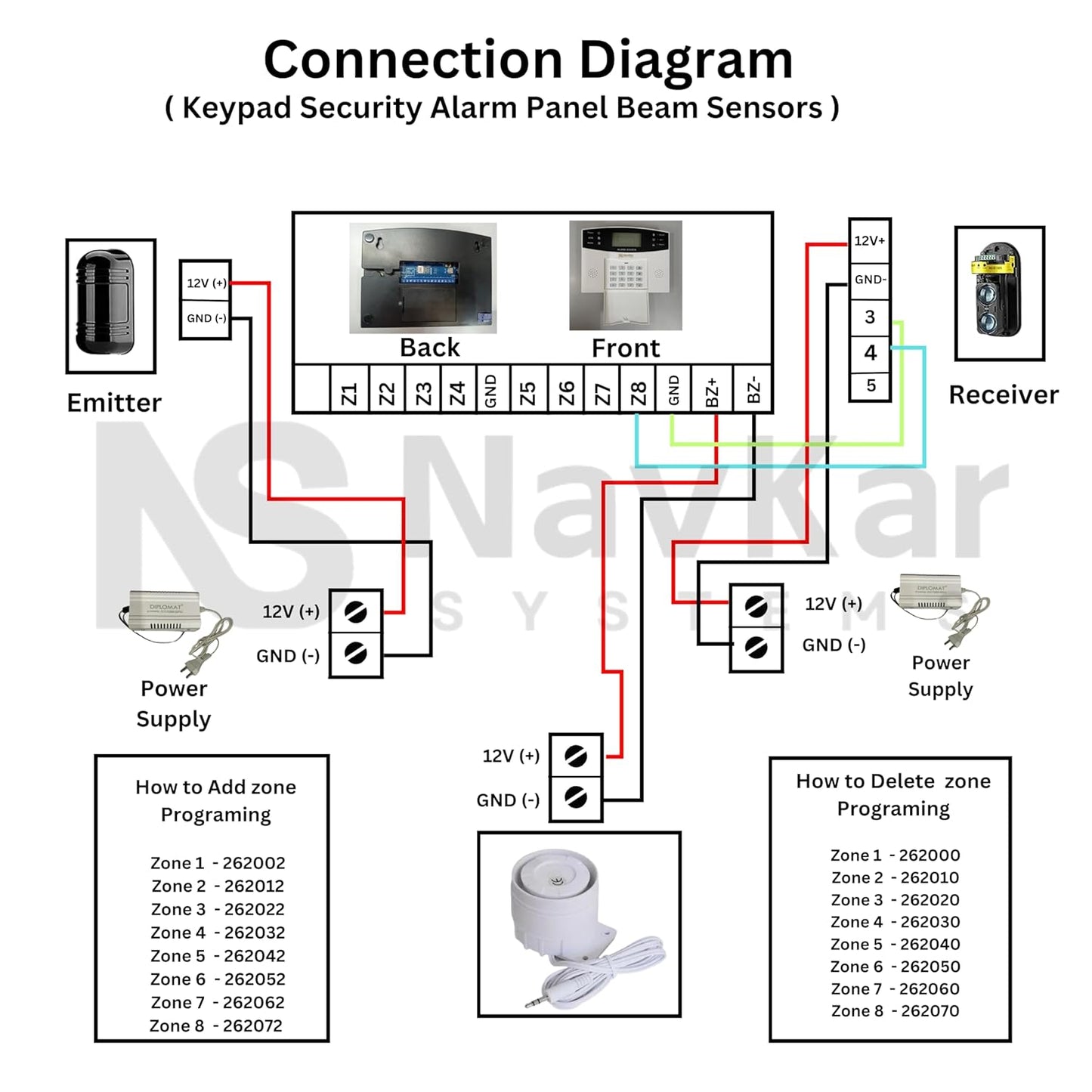
- Connect the Alarm System: Connect the ABT-100 alarm output to the ACJ-400 through the appropriate wired input or use the specified 315/433 MHz RF transmitter configuration where supplied.
- Align and Test the Beams: Adjust the transmitter and receiver so both infrared beams are correctly aligned. Interrupt the beam to confirm that the ACJ-400 detects the intrusion.
-
Configure the ACJ-400: Pair/register the beam sensor according to the selected wired or wireless configuration and assign the required defense zone. The manual supports up to 200 wireless zones.
Wiring
The exact connection depends on whether the ABT-100 is supplied in wired relay-output or RF wireless configuration. The ACJ-400 manual provides wired-zone terminals and wireless accessory learning; the ABT-100 listing specifies an NO/NC alarm output and an optional 315/433 MHz RF transmitter configuration.
- Power: Supply the ACJ-400 and ABT-100 using their compatible power adapters. The ABT-100 supports DC 10.5–30V.
- Input: ACJ-400 wired defense-zone input, when using the wired ABT-100 relay-output configuration. The panel provides 8 wired defense zones.
- Output: ABT-100 NO/NC alarm relay output to the selected alarm input, or RF transmission to the ACJ-400 in the supported wireless configuration.
- Other Connections: Insert the GSM SIM card into the ACJ-400 for GSM alerts and configure WiFi when using app-based communication. The panel supports WiFi + 4G/GSM alarm communication.
Programming
- Set Up the ACJ-400: Insert the SIM card, power on the alarm panel and configure the required GSM/WiFi connection.
- Register the Beam Sensor: For the wireless configuration, enter the wireless-zone learning mode, select the required zone and trigger the detector to complete pairing.
- Set the Zone Type: Assign the required alarm mode to the beam sensor zone. The manual supports perimeter, fire, door, window and other alarm types.
- Set Alert Numbers: Program the required alarm phone numbers so the system can send SMS and make automatic alarm calls when the beam is interrupted.
Operation
- Arm the System: Arm the ACJ-400 using the remote control or configured app. The connected beam sensor then monitors the protected perimeter.
- Detect Intrusion: When an intruder interrupts the dual infrared beams, the ABT-100 generates an alarm signal.
- Trigger Alarm: The ACJ-400 activates the configured alarm response and can send an SMS followed by automatic calls to preset numbers.
- Disarm/Reset: Disarm the ACJ-400 after checking the protected area and reset the system for further monitoring.
Troubleshooting
-
Problem: ACJ-400 alarm panel does not power on
Solution: Check the power adapter, power connection, electrical supply, and backup battery connection. Make sure the compatible power supply is being used. -
Problem: ABT-100 beam sensor does not trigger the alarm
Solution: Check that the transmitter and receiver are correctly aligned, the beam path is clear, the sensor is powered, and the beam sensor is properly registered/configured with the ACJ-400. The ABT-100 uses dual-beam infrared detection. -
Problem: SMS or phone call alerts are not received
Solution: Check the SIM card, GSM network signal, preset phone numbers, and alarm communication settings. For WiFi/app alerts, also verify the WiFi connection.
Common Problems
- Wireless/beam sensor not responding – Check power, battery level, alignment, pairing/registration, and distance from the ACJ-400. Re-register the sensor if required.
- False alarm or unwanted triggering – Check the ABT-100 beam alignment, keep the beam path clear, and verify the assigned zone and alarm settings. The dual-beam design is intended to help reduce false alarms.
-
WiFi/GSM notification not working – Check the WiFi connection, SIM card, GSM signal, preset phone numbers, and communication settings.
FAQs
Q: Can the ACJ-400 work with the ABT-100 dual-beam sensor?
A: Yes. The ACJ-400 supports beam sensors, and the ABT-100 is a dual-beam infrared perimeter detector designed for intrusion detection.
Q: What should I check if the ABT-100 is giving false alarms?
A: Check that the transmitter and receiver are properly aligned and that the beam path is clear. Also verify the sensor's zone and alarm settings in the ACJ-400.
Q: Can the ACJ-400 send alerts to my phone?
A: Yes. When correctly configured, the ACJ-400 can send SMS and phone-call alerts through GSM and supports app-based monitoring through WiFi.
Spare Parts
- ACJ-400 Power Adapter – Replacement power adapter for the ACJ-400 alarm control panel.
- ABT-100 Dual-Beam IR Sensor – Replacement dual-beam infrared perimeter detector.
-
Wireless Remote Control – Replacement remote control for arming, disarming, and emergency functions.
Warranty
Warranty Period: 1 Year
The ACJ-400 security alarm panel is covered by a 1-year warranty against manufacturing defects under normal use. The warranty does not cover damage caused by incorrect installation, improper wiring, physical damage, power fluctuations, water/moisture, unauthorized modification, or misuse.
Videos
Manuals
- User Manual: Click Here to check PDF File
- Installation Manual:

Downloads
- [Datasheet]: Refer to the user manual
- [Wiring Diagram]: Refer to the user manual
- [Catalogue / Brochure]: N/A
- [Other Download]: N/A
Customer Questions
Q: Does the ACJ-400 support both WiFi and GSM connectivity?
A: Yes. The ACJ-400 supports WiFi and GSM connectivity for remote monitoring and alarm notifications.
Q: Can the ACJ-400 send alerts to my mobile phone?
A: Yes. When configured correctly, the system can send SMS and phone-call alerts to preset numbers through GSM.
Q: Can I use the ABT-100 dual-beam sensor with the ACJ-400?
A: Yes. The ACJ-400 supports beam sensors, and the ABT-100 is a dual-beam infrared intrusion detector designed for perimeter protection.
Q: What is the purpose of the ABT-100 beam sensor?
A: It creates an infrared beam barrier across a protected area. When the beam is interrupted, the sensor can trigger the connected security alarm system.
Q: Can additional wireless sensors be added to the ACJ-400?
A: Yes. Compatible wireless sensors and security accessories can be registered with the ACJ-400 according to its supported capacity and configuration.
Q: Where can this security system be used?
A: It can be used for residential and commercial security applications, including homes, offices, shops, and perimeter areas such as gardens and property boundaries.
Escalation to Support
If the issue cannot be resolved using the information above, Please contact Navkar Systems at Whatsapp Support number: 90536 35607 with the following information:
- Product Model:
- Purchase Date:
- Problem Description:
- Installation Details:
- Photos / Videos:
- Previous Troubleshooting Performed:
Frequently asked questions
How does a wireless alarm system work?
Sensors on doors, windows and rooms send a radio signal to the alarm panel. The panel sounds a loud siren and, on Wi-Fi or GSM models, sends phone alerts.
Can I add more sensors later?
Yes. Wireless sensors, remotes and panic buttons from the same frequency can be paired with the panel. The number of zones is listed in the product details.
Does it work without internet?
GSM models use a SIM card to call or send SMS even without Wi-Fi. Wi-Fi models need working internet for app alerts.
Do prices include GST?
Yes. Yes. All prices are inclusive of GST, and NavKar Systems delivers across India.
Is technical support available?
Yes. Free technical support is available for installation and setup.