NavKar Systems
RML-8K Electronic Door Lock with Biometric RFID Password Access Control Support - Stainless Steel Body | Electronic Rim Lock | Silver
RML-8K Electronic Door Lock with Biometric RFID Password Access Control Support - Stainless Steel Body | Electronic Rim Lock | Silver

Buying here, direct, gets you the same warranty and prices inclusive of GST, plus free setup help on call and WhatsApp.
View on Amazon.inCouldn't load pickup availability
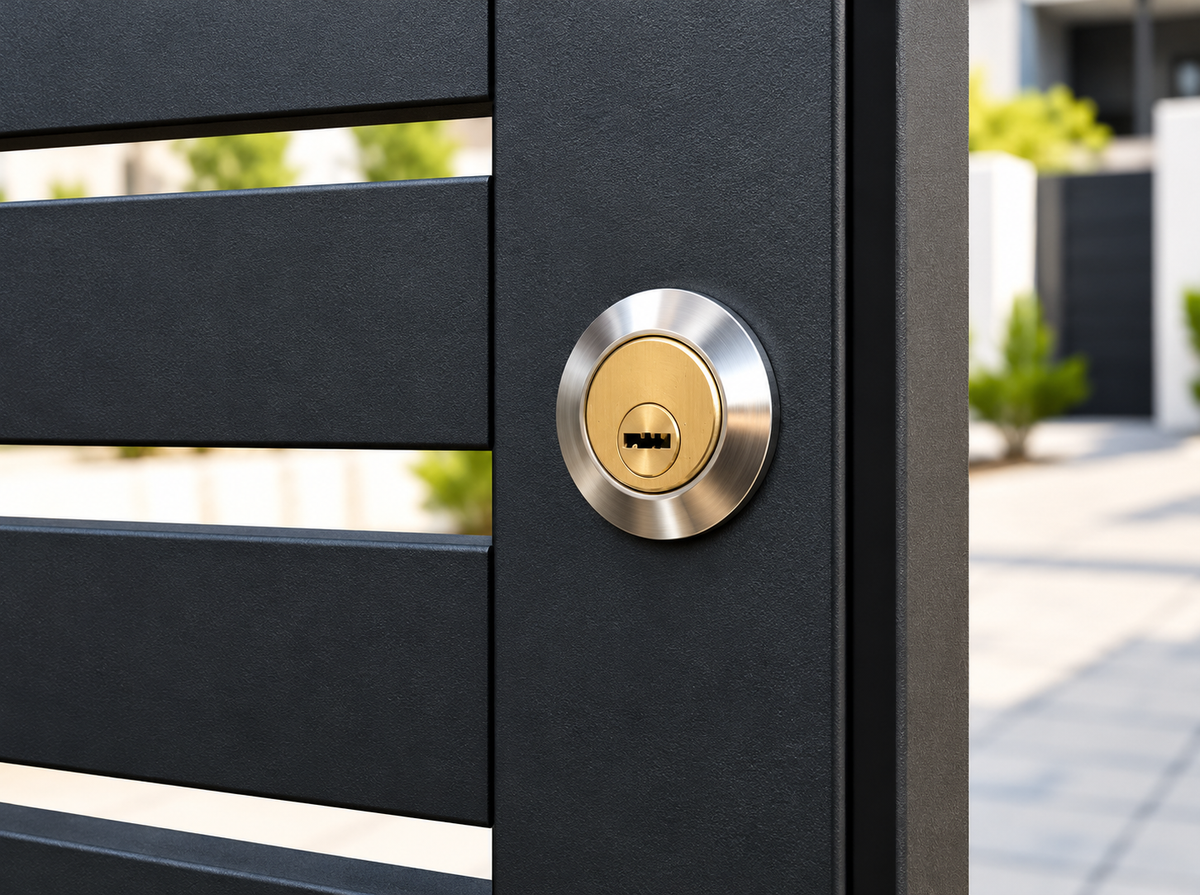
The NavKar Systems RML-8K is a weatherproof 12 V DC electronic rim lock with a stainless steel body, made for main metal gates and doors. This listing is the lock only. Connect it to your own 12 V DC lock supply or to a compatible biometric, RFID or password access-control system. To open the gate by remote, choose the Combo-CN231, which adds the lock supply and remotes.
Highlights
- Weatherproof stainless steel body. Built for outdoor main gates, in rain and sun.
- Key backup. A brass key cylinder with 8 keys opens the gate by hand during a power cut.
- Self-locking latch. The latch locks again by itself as the gate closes.
- Internal locking and dead locking. Lock from inside to stop unwanted exit, or keep the lock free.
- Neat from the outside. Only the key cylinder shows on the outer face of the gate.
- Fitting kit included. Cylinder ring, mounting plate and screws come in the box.
- Works with access control. Compatible with biometric, RFID and password systems through a 12 V DC controller or lock supply.
Choose your kit
| Rim Lock only (this listing) | Combo-CN231 | |
| Remote control | Needs your own supply | |
| Lock supply included | No | |
| Exit switch and door phone input | Via your own supply | |
| Best for | Replacing a lock, or use with an access-control system |
In the box
1 x RML-8K electronic rim lock with strike, 1 x key cylinder, 8 keys, 1 x cylinder ring, 1 x mounting plate and fixing screws. The lock supply, remotes, video door phone, exit switch and cable are not included.
Specifications
| Model | RML-8K electronic rim lock |
| Operating voltage | 12 V DC |
| Finish | Silver stainless steel body, brass key cylinder |
| Key cylinder flange diameter | 32 mm |
| Key cylinder body length | 25 mm |
| Overall cylinder length with tail | 105 mm |
| Keys | 8 |
| Mounting | Inside face of a metal gate or door, strike on the frame |
| Warranty | One year from the date of purchase, with the bill |
Install it in six steps
- Plan the position. Fit the lock on the inside face of the gate at a comfortable height. The strike goes on the gate frame, lined up with the latch.
- Fit the key cylinder. Drill through the gate, fit the cylinder from outside with the ring, then cut the tail to suit the gate thickness.
- Mount the lock. Fix the lock and mounting plate with the screws supplied. Close the gate and check that the latch enters the strike smoothly.
- Mount the supply indoors. Keep the supply on a dry wall inside the house, away from water, moisture and heat.
- Run the wires. Connect the lock to the LOCK terminals of your 12 V DC supply. Use the correct cable for the distance.
- Power on and test. Test the exit switch, remote or controller, and check that the key opens the lock too.
Safety first. Switch off mains power before wiring. Installation by a trained electrician is recommended. Mounting on a metal gate may need a welded plate.
Care and warranty
- Never leave the lock powered continuously. Power it only when opening, as the NavKar lock supply does with its 1 second inching.
- Wipe the lock with a dry cloth. Do not use acids or strong cleaners.
- Keep a spare key in a safe place inside the house.
- Not covered by warranty: physical damage, water damage, or a burnt lock coil from wrong wiring or continuous power.
Watch and buy
Product demonstration video:
Also available on Amazon: Buy the RML-8K on Amazon.in
Frequently asked questions
Is this lock biometric?
No. The RML-8K is an electric rim lock. It is compatible with biometric, RFID and password access-control systems when you connect it to a 12 V DC controller or lock supply.
Does it come with a power supply or remotes?
No. This listing is the lock only. The Combo-CN231 includes the PSRM-01 lock supply and remotes.
What happens in a power cut?
Open the gate with the key. The lock works again as soon as power returns.
Will it fit my gate?
Rim locks mount on the inside face of most metal and wooden gates and doors. Mounting on a metal gate may need a welded plate.
Do prices include GST?
Yes. All NavKar Systems prices are inclusive of GST.
Who should install it?
A trained electrician or carpenter.
Wiring diagrams and manual download
The RML-8K rim lock runs on 12 V DC. Its two wires go to the LOCK terminals of a NavKar lock supply. Follow the diagram for the supply you use.
Wiring with the PSRM-01 Remote Lock Supply

Wiring with the PSWF-01 Wi-Fi Lock Supply

Terminal guide
| Terminal | What to connect |
|---|---|
| LOCK | The two wires of the RML-8K rim lock (12 V DC output) |
| SW | Exit switch: a normally open (NO) push button, optional |
| -VDP+ | Lock output of a video door phone outdoor station: - to -, + to +, optional |
| ADD | Press once, then press any key on the remote to pair it. The LED blinks to confirm |
| AC 230 V | Mains input, 50 Hz. Connect last, after all other wiring is done |
- Switch off mains power before wiring.
- Connect the lock wires to LOCK, the exit switch to SW and the video door phone, if used, to -VDP+.
- Mount the supply indoors on a dry wall, away from water and heat.
- Connect mains last, then pair your remotes with ADD or add the Wi-Fi supply in the Smart Life app.
Safety first. Complete all wiring before connecting to AC 230 V. Installation by a trained electrician is recommended.
Download the NavKar Electric Rim Lock Catalogue and User Manual (PDF, 21 pages) with kit selection, installation, wiring, remote pairing, Smart Life app set-up and troubleshooting.
Warranty terms: what is covered and what is not
Every NavKar Systems product carries a 1 year warranty from the date of purchase, with the bill. Please read these exclusions before you buy, so there are no surprises later.
- Lock coil: no warranty. The coil inside an electric lock is made to be energised for about one second. If the open button, exit switch or remote key is pressed and held for too long, the coil gets very hot and burns out. Many people press the button for too long, so coil failure is not covered by warranty. Press once, briefly.
- Power supply: no warranty for water damage or physical damage. The power supply (sold separately or in a kit) is for indoor use only. Water, rain, moisture, a fall, a crack or any other physical damage is not covered.
- All other manufacturing defects are covered for 1 year with the bill.
Choose your RML-8K kit
The NavKar RML-8K weatherproof electric rim lock is sold three ways: the RML-8K lock only, Combo-CN231 (lock + PSRM-01 supply + 3 remotes) and Combo-CN111 (lock + PSWF-01 Wi-Fi supply + 3 remotes). Compare them below and pick the one that fits your gate.
RML-8K Rim Lock
- RML-8K electric rim lock with strike
- Key cylinder, 8 keys, ring, plate and screws
- Connect to your own 12 V DC supply or access-control system
Best for: replacing a lock, or adding it to biometric, RFID or password access control.
View Kit 1Combo-CN231 Electronic Door Lock + Power Supply with 3 Remotes
- RML-8K lock with PSRM-01 remote lock supply
- 3 RM-BR0243 remotes
- Exit switch and video door phone input
- No Wi-Fi or app needed
Best for: simple remote opening of the main gate, with door phone support.
View Kit 2Combo-CN111 Smart Electronic Rim Lock with 3 Remotes and Mobile App
- RML-8K lock with PSWF-01 Wi-Fi lock supply
- 3 remotes
- Smart Life app, Alexa and Google Home
- Share with up to 15 family members
Best for: opening the gate from your phone, even when you are away.
View Kit 3| Kit 1 · Lock only | Kit 2 · Combo-CN231 | Kit 3 · Combo-CN111 | |
|---|---|---|---|
| Price | |||
| RML-8K weatherproof rim lock | Yes | Yes | Yes |
| Lock supply included | No, use your own 12 V DC | Yes, PSRM-01 | Yes, PSWF-01 Wi-Fi |
| Remotes included | No | Yes, 3 | Yes, 3 (up to 20 can be paired) |
| Open by remote | Needs a supply | Yes | Yes |
| Smart Life app, from anywhere | No | No | Yes |
| Alexa and Google Home | No | No | Yes |
| Family members in the app | - | - | Up to 15 |
| Exit switch and video door phone input | Via your own supply | Yes | Yes |
| Needs Wi-Fi or internet | No | No | Only for app and voice. Remotes, switch and key work without internet |
| Key backup in a power cut | Yes | Yes | Yes |
| Warranty | 1 year with bill | 1 year with bill | 1 year with bill |
Which kit should I choose?
Every kit in detail
Kit 1 · RML-8K Rim Lock only
In the box
- 1 x RML-8K electric rim lock with strike
- 1 x key cylinder and 8 keys
- 1 x cylinder ring and 1 x mounting plate
- Fixing screws
Good to know
Silver stainless steel body with a brass key cylinder. The cylinder is 32 mm across, 25 mm long and 105 mm overall with its tail. It runs on 12 V DC, so connect it to your own lock supply or a compatible biometric, RFID or password system.
Remotes, a supply, a video door phone, an exit switch and cable are not included.
Kit 2 · Combo-CN231 Electronic Door Lock + Power Supply with 3 Remotes
In the box
- 1 x RML-8K electric rim lock with strike
- 1 x PSRM-01 remote lock supply
- 3 x RM-BR0243 remotes
- 1 x key cylinder, 8 keys, ring, plate and screws
How it works
The PSRM-01 supply powers the lock at 12 V DC from AC 230 V mains. Press a remote to open the gate. You can also connect a push-button exit switch to SW, or the lock output of a video door phone to the VDP terminals, so the gate opens from inside the house.
Pair a remote in seconds: press ADD once, then press any key on the remote. The LED blinks to confirm. There is no Wi-Fi or app, so it keeps working without internet. Mount the supply indoors, away from water.
Kit 3 · Combo-CN111 Smart Electronic Rim Lock with 3 Remotes and Mobile App
In the box
- 1 x RML-8K electric rim lock with strike
- 1 x PSWF-01 Wi-Fi lock supply
- 3 x remotes
- 1 x key cylinder, 8 keys, ring, plate and screws
How it works
Open the gate from the free Smart Life app on Android or iOS, from anywhere in the world. Add up to 15 family members, each on their own phone, and pair up to 20 remotes. Link the Smart Life account to Alexa or Google Home to open the gate by voice.
Setup takes a few minutes: add the device in Smart Life, press the WIFI pinhole button on the back of the supply, then choose your 2.4 GHz home Wi-Fi. The supply does not work on 5 GHz. Remotes, the exit switch and the key work without internet.
Frequently asked questions about the RML-8K kits
What is the difference between the RML-8K lock only, Combo-CN231 and Combo-CN111?
All three use the same weatherproof RML-8K electric rim lock. Kit 1 is the lock only. Kit 2 adds the PSRM-01 remote lock supply and 3 remotes. Kit 3 adds the PSWF-01 Wi-Fi lock supply and 3 remotes, and lets you open the gate from the Smart Life app, Alexa and Google Home.
Which RML-8K kit should I buy for my main gate?
Buy Kit 1 if you already have a 12 V DC supply or access-control system. Buy Kit 2 for simple remote opening without Wi-Fi. Buy Kit 3 if you want to open the gate from your phone anywhere and share it with family.
Can I open the RML-8K from my phone?
Yes, with Kit 3, the Combo-CN111. The free Smart Life app on Android and iOS opens the gate from anywhere, and Alexa and Google Home can open it by voice. Kit 1 and Kit 2 do not have app control.
Does the RML-8K work without Wi-Fi or internet?
Yes. Kit 1 and Kit 2 do not need Wi-Fi. With Kit 3, only the app and voice control need Wi-Fi. The remotes, the exit switch and the key keep working without internet.
Can I connect a video door phone or an exit switch?
Yes. With Kit 2 and Kit 3, connect a push-button exit switch to SW and the lock output of a video door phone to the VDP terminals of the supply. With Kit 1, connect them to your own lock supply.
What happens to the RML-8K in a power cut?
Open the gate with the key. The brass key cylinder comes with 8 keys, and the lock works again as soon as power returns.
Does the Combo-CN111 work on 5 GHz Wi-Fi?
No. The PSWF-01 Wi-Fi lock supply works on 2.4 GHz Wi-Fi only. If your router shows two networks, choose the 2.4 GHz one.
How many remotes can I pair with the Combo-CN111?
You get 3 remotes in the box and can pair up to 20 remotes with the Wi-Fi lock supply. You can also add up to 15 family members in the app.
Is the RML-8K lock biometric?
No. It is an electric rim lock. It is compatible with biometric, RFID and password access-control systems when connected to a 12 V DC controller or lock supply.
Is there a warranty, and do prices include GST?
Yes. Every kit has a 1 year warranty from the date of purchase with the bill, and all NavKar Systems prices are inclusive of GST.
All kits: 1 year warranty from the date of purchase with the bill, and all prices include GST. A video door phone, exit switch, cable and installation are not included. Installation by a trained electrician is recommended. Pictures are for illustration.