Skip to product information
1 of 12

NavKar Systems

Combo-CN59 Stainless Steel Polished Electronic Lock for House Main Metal Door with Remote

Combo-CN59 Stainless Steel Polished Electronic Lock for House Main Metal Door with Remote

Regular price Rs. 3,049.00
Regular price MRP Rs. 5,999.00 Sale price Rs. 3,049.00
49% OFFYou save Rs. 2,950 Sold out
Taxes included. Shipping calculated at checkout.
Free shipping, pan-India
Cash on delivery
GST invoice
Free tech support

Stainless Steel Polished Electronic Lock for House Main Metal Door with Remote

Product Overview

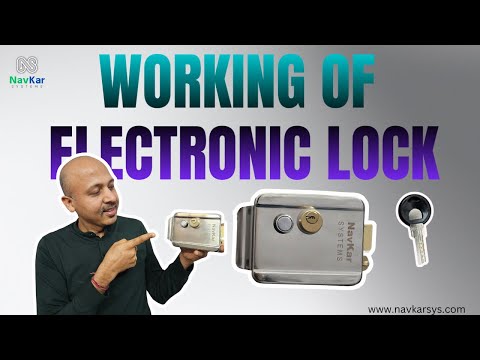
The NAVKAR SYSTEMS Combo-CN59 is a stainless steel motorised electronic rim lock designed for main metal doors. It is supplied with a remote receiver, 3 RF remotes and power adapter, allowing the lock to be operated remotely. The system supports compatible audio/video door-phone applications and includes a mechanical key/cylinder for manual access. It is designed for remote-only operation in the supplied configuration.

Main Purpose

The NAVKAR SYSTEMS Combo-CN59 is designed to provide remote-controlled electronic locking and unlocking for main metal doors. It uses a motorised stainless-steel rim lock with an RF remote receiver and supplied remotes.

Note:-For Remote Kit you have to use 12V 1 Amp adapter and needs to buy separately for Electronic Lock you can use 24V AC Power supply or 12V 1 Amp adapter whichever is available to you, if you are using 12V 1Amp Adapter and using a long wire to open the lock using push button and the current is not enough, you can increase the current by using 12V 2 Amp adapter.

Key Benefits

  • Remote-Controlled Access: Convenient lock operation using RF remote controls.
  • Motorised Locking: Provides electronic locking and unlocking through the motorised mechanism.
  • Stainless Steel Construction: Durable stainless-steel lock body for main-door applications.
  • Complete Remote Kit: Includes the electronic lock, receiver, adapter and 3 remotes.
  • Door Phone Compatibility: Supports compatible audio/video door-phone systems.
  • Manual Key Access: Provides mechanical key operation as an additional access method.

Important Features

  • Model: Combo-CN59 / RML-8K
  • Lock Type: Motorised Electronic Rim Lock
  • Material: Stainless Steel
  • Color: Silver
  • Control: RF Remote
  • Remote Receiver: RR-120243
  • Remotes: 3 × RM-BR0231 Brown Remotes
  • Adapter: DP-08
  • Application: Main Metal Doors
  • Operation: Remote-only configuration
  • Installation: Suitable for metal-door installation
  • Note: Lock, adapter and remote appearance may vary without prior notice.

Product Specifications

  • Model: Combo-CN59 / RML-8K
  • Product Type: Motorised Stainless Steel Electronic Rim Lock with Remote Kit
  • Brand: NAVKAR SYSTEMS
  • Power Supply: 12V 2A Adapter Included; product details also specify 12V 1A / 24V AC options depending on installation
  • Communication: RF Wireless Remote
  • Operating Range: Not specified
  • Material: Stainless Steel
  • Color: Silver
  • Dimensions: Package: 7.9 × 7.1 × 4.7 inches; lock dimensions not specified
  • Weight: Not specified
  • Remote Receiver: RR-120243
  • Remote Controls: 3 × RM-BR0231
  • Adapter: DP-08
  • Door Application: Main Metal Door
  • Other Specifications: Motorised locking mechanism, mechanical key access, compatible with audio/video door phones, remote-only configuration. Lock, adapter and remote appearance may vary without prior notice.

Applications

  • Main Metal Entrance Doors – Designed for residential main doors and metal entrance gates where electronic remote-controlled locking is required.
  • Residential Buildings – Suitable for house main gates and entrance doors, providing convenient locking and unlocking through the supplied RF remotes.
  • Commercial Offices – Can be used on suitable metal entrance doors in offices and other commercial premises requiring remote access control.
  • Audio/Video Door Phone Integration – The electronic lock can support compatible audio/video door phone systems, allowing it to be incorporated into an existing door-entry setup.
  • Remote-Controlled Access – Suitable for locations where the user wants to operate the door lock from a remote rather than manually operating the lock mechanism each time.
  • Metal Gate Installations – The supplied installation illustration specifically shows mounting considerations for a metal gate/door, including the lock body and cylinder alignment.

Suitable For

  • Main Metal Doors & Gates – Suitable for compatible metal entrance doors and gates where the rim-lock body can be properly mounted and aligned.
  • Remote-Only Operation – The supplied Combo-CN59 configuration is intended for operating the electronic lock through the RF receiver and supplied remotes.
  • Residential Users – Useful for homeowners who want convenient remote operation of a main metal entrance door.
  • Offices & Commercial Premises – Suitable for offices and similar premises where controlled electronic entry is required.
  • Doors With Proper Lock Alignment – Suitable where the door frame, cylinder opening and lock position can be aligned according to the installation plate shown in the product images.
  • Installations With Compatible Door Phones – Suitable for systems using compatible audio/video door phones because the lock supports this type of integration.

Not Suitable For

  • Remote + Wired Switch Without Additional Configuration – The supplied Combo-CN59 kit is specified for remote-only operation; a separate power-supply configuration is suggested when both remote and wired push-button operation are required.
  • Improperly Aligned Doors – Installation may not work correctly if the lock body, cylinder and door-frame position are not properly aligned.
  • Doors Without Suitable Mounting Space – The rim-lock body requires appropriate space on the door and frame for secure mounting and movement of the locking mechanism.
  • Physical Damage or Coil Burning – The product information specifically excludes physical damage, adapter damage and burning of the lock coil from warranty coverage.
  • Unprotected Electrical Installation – The receiver and power connections should be installed correctly and protected from unsuitable environmental exposure.
  • Non-Compatible Door Types – Before installation on doors other than suitable metal main doors/gates, the mounting arrangement and compatibility should be checked.

Package Contents

  • RML-8K Electronic Rim Lock – 1 Pc – Stainless-steel motorised electronic lock shown in the product and package images, intended for mounting on the main door/gate.
  • DP-08 Power Supply – 1 Pc – Power supply included with the Combo-CN59 package for supplying the electronic lock system.
  • RR-120243 Remote Receiver – 1 Pc – RF receiver module used to receive commands from the supplied wireless remotes and control the electronic lock.
  • RM-BR0231 Remote Controls – 3 Pcs – Three wireless remotes supplied for convenient remote operation of the lock.
  • Lock Cylinder & Keys – The package images also show the mechanical cylinder/key arrangement supplied with the rim-lock assembly for manual key operation.
  • Mounting Hardware – The package images show the mounting components required for installing the lock assembly; exact individual quantities may vary with the supplied kit.
  • Installation Components – The lock body, cylinder assembly, receiver, remotes and power components are supplied as a combined remote-operated electronic lock kit. The manufacturer lists the core package as RML-8K, DP-08, three RM-BR0231 remotes and RR-120243 receiver.

Installation

  1. Check Door Type & Lock Position – Confirm that the main metal door/gate has sufficient flat mounting space for the rim lock and that the door can close properly against the door frame.
  2. Mark the Cylinder Hole – Use the installation plate as a template and mark the Ø30 mm cylinder hole. The diagram shows the cylinder-hole centre positioned approximately 60 mm from the door edge.
  3. Maintain Recommended Clearance – Keep approximately 5 mm recommended distance between the door edge/lock arrangement and the door frame as indicated in the installation diagram. Proper clearance helps prevent the lock from rubbing against the frame.
  4. Select Left- or Right-Hand Installation – The mounting plate provides positioning references for both left-hand and right-hand doors. Select the orientation according to the actual door opening direction.
  5. Fix the Lock Body – Drill the required mounting holes according to the template and securely mount the electronic rim lock on the door. Make sure the cylinder is correctly aligned with the marked cylinder-hole centre.
  6. Install the Door-Frame Locking Part – Position the corresponding locking/receiving part on the door frame so that the lock engages correctly when the door is closed. Check the alignment before applying power.
  7. Check Mechanical Movement – Close and open the door manually to confirm that the latch/locking mechanism moves freely and does not experience excessive pressure or obstruction.
  8. Install the RF Receiver – Mount the RF receiver in a suitable location near the lock and power supply. Avoid placing it unnecessarily close to large metal surfaces, electronic equipment or strong electromagnetic sources, as these can affect wireless operation.

Wiring

  • Power: Connect Power Supply +12V → Remote Receiver +12V and Power Supply GND → Remote Receiver GND.
  • Input: The RF receiver receives the wireless command from the programmed remote control at 433.92 MHz.
  • Output: Connect Lock Wire 1 → Receiver NO and Lock Wire 2 → Receiver GND, as shown in the supplied wiring diagram.
  • Relay Connection: Connect Receiver COM → Receiver +12V, following the connection diagram supplied with the product.
  • Remote Receiver: The receiver acts as the interface between the wireless remote and the electronic rim lock, switching its relay when a programmed remote command is received.
  • Power Requirement: The RF controller manual specifies DC12V operating voltage. The supplied connection illustration shows a 12V 3A power supply.
  • Important: Switch OFF the power before making, changing or checking electrical connections.

Programming

  1. Power the RF Receiver – After completing the wiring, switch on the DC12V supply and confirm that the receiver is powered.
  2. Select the Required Receiver Mode – The RF controller manual provides Jogging Mode, Self-Locking Mode and Interlock Mode, along with separate timed learning options.
  3. Pair the Remote – Press the receiver's learning button according to the desired mode, then press the required button on the remote control. The LED indication confirms successful learning.
  4. Jogging Mode – Press the learning button once and then press the desired remote button. The receiver learns the remote for momentary/jogging operation.
  5. Self-Locking Mode – Press the learning button twice and then press the desired remote button. The receiver learns the remote for self-locking operation.
  6. Interlock Mode – Use the learning-button sequence specified for interlock mode and then press the required remote button to complete learning.
  7. Timed Learning – The controller manual provides 5-second, 10-second, 15-second and 20-second delay-learning methods for the corresponding receiver functions.
  8. Clear All Learned Remotes – To erase the stored remote controls, press the receiver's learning button eight times. The LED flashes continuously to indicate that the remote controls have been cleared successfully.
  9. Test the Remote – After programming, press the learned remote button and verify that the receiver activates the electronic rim lock correctly.

Operation

  1. Press the Programmed Remote Button – Press the learned button on the supplied RF remote. The receiver detects the wireless signal and activates its programmed relay function.
  2. Receiver Operates the Lock – The RF receiver switches its output according to the programmed operating mode, allowing the electronic rim lock to release.
  3. Open the Door – Once the lock releases, open the door normally without forcing the door or locking mechanism.
  4. Close the Door – After entering or exiting, close the door and ensure that the rim-lock latch aligns correctly with the door-frame receiving section.
  5. Use the Selected Mode – In Jogging Mode, the receiver operates momentarily. In Self-Locking Mode, the relay changes state according to successive remote commands. The actual operation depends on the mode programmed into the RF receiver.
  6. Use the Mechanical Key When Required – The lock shown in the supplied product image includes a mechanical cylinder/key arrangement, providing an alternative manual method of operating the lock.
  7. Maintain Reliable RF Communication – Keep the receiver away from unnecessary metal obstructions and strong electromagnetic interference. If remote response becomes weak, check the remote battery and receiver placement.

Troubleshooting

  • Problem: Remote does not operate the electronic lock.
    Solution: Check that the RF receiver has DC12V power, verify the receiver wiring, and re-pair the remote using the learning-button procedure.
  • Problem: Remote operating range is reduced or inconsistent.
    Solution: Check the remote battery and keep the receiver away from metal walls, large electronic devices and strong electromagnetic fields, as advised in the RF controller manual.
  • Problem: Lock does not release after pressing the remote.
    Solution: Check the NO, GND, COM and +12V connections against the supplied wiring diagram. Also check that the door is not putting excessive mechanical pressure on the lock.
  • Problem: Remote was previously working but no longer operates the receiver.
    Solution: The remote may have been cleared from the receiver. Re-learn the remote using the required programming mode.
  • Problem: Lock operation is mechanically difficult.
    Solution: Check the alignment between the lock body and door frame. The installation diagram shows approximately 60 mm cylinder positioning, a Ø30 mm cylinder hole and a recommended 5 mm clearance.
  • Problem: Remote controls need to be removed from the receiver.
    Solution: Use the receiver's clear function. The manual specifies pressing the learning button eight times; continuous LED flashing indicates successful clearing.

Common Problems

  • Remote not responding – Check receiver power, remote battery and remote pairing.
  • Lock not releasing smoothly – Check door/lock alignment and ensure the door is not pressing against the locking mechanism.
  • Short RF range – Move the receiver away from metal obstructions and sources of electromagnetic interference.
  • Incorrect relay operation – Check whether Jogging, Self-Locking or Interlock mode has been programmed.
  • Receiver not learning the remote – Repeat the correct learning-button sequence and confirm the LED indication during programming.

FAQs

Q: What type of remote frequency does the RF controller use?
A: The supplied RF controller manual specifies a 433.92 MHz working frequency and wireless RF remote control operation.

Q: What power supply does the RF receiver require?
A: The RF controller manual specifies DC12V operating voltage. The supplied connection diagram illustrates a 12V 3A power supply.

Q: How many remotes are included with the Combo-CN59?
A: The listed Combo-CN59 package includes 3 RM-BR0231 remote controls along with the RML-8K lock, DP-08 adapter and RR-120243 receiver.

Q: Can the lock be operated by remote only?
A: Yes. The manufacturer specifically describes this Combo-CN59 configuration as suitable for remote-only operation.

Q: Can the lock also be operated using a wired push button?
A: The manufacturer recommends a different lock/power-supply configuration when both remote and wired-switch operation are required.

Q: Can the RF receiver store remote controls?
A: Yes. The receiver uses a learning-code method for pairing remote controls. The manual also provides a procedure to clear the learned remote controls.

Q: What RF receiver operating modes are available?
A: The manual shows Jogging Mode, Self-Locking Mode and Interlock Mode, along with timed learning options.

Q: Does the lock support audio/video door phones?
A: The manufacturer states that the electronic lock supports audio/video door phone systems.

Spare Parts

  • RF Remote Control – Replacement remote control can be used if an original remote is lost or damaged, subject to compatibility.
  • RF Remote Receiver – Replacement receiver for the supplied remote-control system, subject to model compatibility.
  • Power Adapter – Replacement adapter may be required in case of adapter failure, subject to the required electrical specification.
  • Electronic Lock / Lock Coil Components – Replacement lock components may be available depending on the fault, model and stock.
  • Mechanical Cylinder & Keys – Replacement mechanical components may be required if the cylinder or keys are lost or damaged.

Spare parts will be provided subject to availability. Compatibility should be confirmed before purchasing replacement electronic or mechanical components.

Warranty

Warranty: The manufacturer specifies that there is no warranty for physical damage, adapter damage, or burning of the lock coil. The product configuration and included components may also vary without prior notice, including the color, shape or size of the lock, adapter and remotes.

For installation and electrical work, use proper wiring and follow the supplied connection diagram. Damage caused by incorrect wiring, unsuitable power supply, physical damage or lock-coil burning should not be treated as a covered warranty issue.

Videos

  • [Installation Video]

  • [Programming Video]

  • [Product Demonstration Video]

Manuals

  • [User Manual]:
  • [Installation Manual]

Downloads

  • [Datasheet]: NA
  • [Wiring Diagram]: Refer To Manual
  • [Catalogue / Brochure]: NA
  • [Other Download]: NA

Customer Questions

Q: Is this lock suitable for a main metal gate or door?
A: Yes. The product is designed as a stainless-steel electronic rim lock for suitable main metal doors and gates.

Q: Can I operate the lock using the supplied remote?
A: Yes. This Combo-CN59 configuration is specifically intended for remote-only operation and includes an RF receiver with 3 remotes.

Q: How many remote controls are included?
A: The package includes 3 RM-BR0231 wireless remote controls.

Q: What is the RF frequency of the remote receiver?
A: The supplied RF controller manual specifies a 433.92 MHz working frequency.

Q: Can the receiver learn additional remotes?
A: Yes. The RF controller supports remote learning. The supplied manual provides learning procedures for Jogging, Self-Locking and Interlock modes.

Q: Can I erase the previously paired remotes?
A: Yes. The supplied RF controller manual shows a clear-remote procedure using the receiver's learning button.

Q: Does the lock support both left-hand and right-hand doors?
A: The supplied installation template provides mounting references for both left-hand and right-hand door installations. Correct mounting and alignment are required.

Q: What size cylinder hole is required?
A: The installation template indicates a Ø30 mm cylinder hole.

Q: What is the cylinder-hole position?
A: The installation diagram indicates approximately 60 mm from the door edge to the cylinder-hole centre.

Q: What clearance should be maintained near the door frame?
A: The supplied installation diagram indicates a 5 mm recommended distance in the mounting arrangement.

Q: What power does the RF receiver require?
A: The RF controller manual specifies DC12V operating voltage.

Q: Can I use a 12V power supply for the lock?
A: The product information specifies 12V adapter options, while the supplied wiring diagram illustrates a 12V 3A power supply. The actual supplied power adapter should be checked before installation.

Q: Can I operate the lock using a wired push button also?
A: This particular Combo-CN59 configuration is specified for remote-only operation. For remote + wired-switch operation, the manufacturer recommends a different lock/power-supply configuration.

Q: Can this lock work with an audio/video door phone?
A: Yes. The manufacturer states that the electronic lock supports audio/video door phones.

Q: Does the lock have a mechanical key option?
A: Yes. The supplied product images show a mechanical cylinder/key arrangement along with the electronic locking mechanism.

Q: What is included in the Combo-CN59 package?
A: The listed package includes 1 RML-8K lock, 1 DP-08 adapter, 3 RM-BR0231 remotes and 1 RR-120243 remote receiver.

Q: What should I do if the remote range becomes weak?
A: Check or replace the remote battery and keep the receiver away from metal walls, large electronic devices and strong electromagnetic interference, as advised in the supplied RF controller manual.

Q: What if the lock does not release even when the remote is pressed?
A: Check the receiver's power supply, remote pairing and +12V, GND, COM and NO wiring. Also check that the door is properly aligned and is not putting excessive pressure on the lock.

Q: Does the product have a warranty?
A: The product information specifically states no warranty for physical damage, adapter damage or burning of the lock coil

Escalation to Support

If the issue cannot be resolved using the information above, Please contact Navkar Systems at Whatsapp Support number: 91384 68548 with the following information:

  • Product Model:
  • Purchase Date:
  • Problem Description:
  • Installation Details:
  • Photos / Videos:
  • Previous Troubleshooting Performed:


View full details