NavKar Systems
TYP-12 Tuya WiFi Switch Smart 1CH Relay Module DC5V 12V 24V Self-Locking RF433 Receive WI-FI Garage Door Opener Work with Alexa
TYP-12 Tuya WiFi Switch Smart 1CH Relay Module DC5V 12V 24V Self-Locking RF433 Receive WI-FI Garage Door Opener Work with Alexa

Buying here, direct, gets you the same warranty and prices inclusive of GST, plus free setup help on call and WhatsApp.
View on Amazon.inCouldn't load pickup availability
The NavKar TYP-12 is a 1-channel Tuya Wi-Fi relay switch. Wire it between your 12 V supply and an electric lock, gate motor input or another low-voltage device, and it can be opened from your phone anywhere in the world, from a 433 MHz remote at the gate, or by Alexa and Google Home.
It runs on 2.4 GHz Wi-Fi through the free Smart Life (Tuya) app, and the 433 MHz remote works even when the internet is down.
Highlights
- Open from anywhere. The Smart Life app on Android or iOS switches the relay from anywhere.
- Remote too. The built-in 433 MHz receiver pairs with NavKar remotes, so the gate opens with one press even without internet.
- Voice control. Links to Amazon Alexa and Google Home through the Smart Life account.
- Schedules and sharing. Set timers to switch at fixed times and share control with family members on their own phones.
- Wide power input. Runs on 7–32 V DC or AC, or 5 V over USB, so it fits most lock supplies and gate motors.
- 10 A relay. Dry-contact output rated 10 A (2200 W), with self-locking mode for lights and pumps and inching mode for locks.
In the box
- 1 x TYP-12 Tuya Wi-Fi 1-channel relay module
Set up in minutes.
Four steps from the box to a lock that opens from your phone.
Watch it in action.
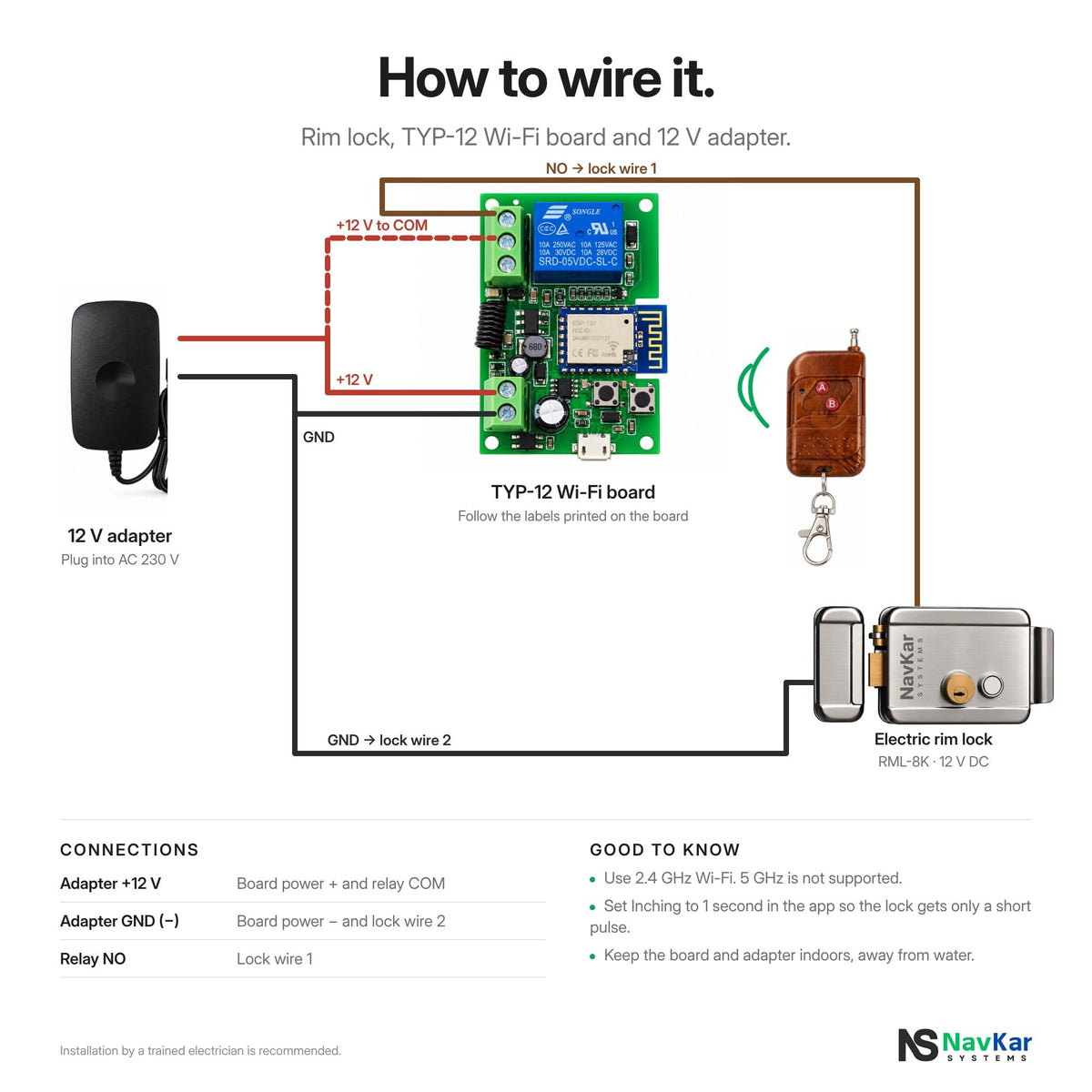
Wiring diagram.
Follow it exactly, or hand it to your electrician.

Specifications
| Model | TYP-12 |
| Channels | 1 relay, dry contact |
| Power input | DC or AC 7–32 V, or USB 5 V |
| Relay rating | 10 A, up to 2200 W |
| Wi-Fi | 2.4 GHz 802.11 b/g/n, plus Bluetooth for pairing |
| Remote | 433 MHz receive, pairs with NavKar remotes |
| App | Smart Life / Tuya Smart, Android and iOS |
| Voice | Amazon Alexa, Google Home |
| Brand | NavKar Systems |
| Warranty | 1 year from the date of purchase, with the bill |
Works with
Installation by a trained electrician is recommended. Keep the module indoors or in a weatherproof box.
Frequently asked questions
Does the TYP-12 work without internet?
The 433 MHz remote works without internet. The Smart Life app and voice control need the module to be on a working 2.4 GHz Wi-Fi network.
Can it open my existing electric lock?
Yes. Power the lock through the relay contacts from your 12 V lock supply, and set Inching to 1 second in the Smart Life app so the lock gets a short pulse each time.
Which Wi-Fi does it need?
2.4 GHz only. If your router shows two networks, choose the 2.4 GHz one when adding the device.
How many phones can control it?
Add the module to one Smart Life account, then share the device with family members from the app.
Does it work with Alexa and Google Home?
Yes. Link your Smart Life account to Alexa or Google Home and the module appears as a switch.
Do prices include GST?
Yes. Yes. All prices are inclusive of GST, and NavKar Systems delivers across India.